Recreating Just Dance 2021’s Search Mechanism
In retrospect, this article doesn’t fully explain the core concepts as well as a video could. I wrote it while experimenting with suffix trees and suffix arrays, but the explanations could be clearer.
While I’m preserving this post for historical reference, I recommend these excellent resources for a better understanding of: Indexes & Binary Search, Suffix arrays & Suffix trees
Introduction
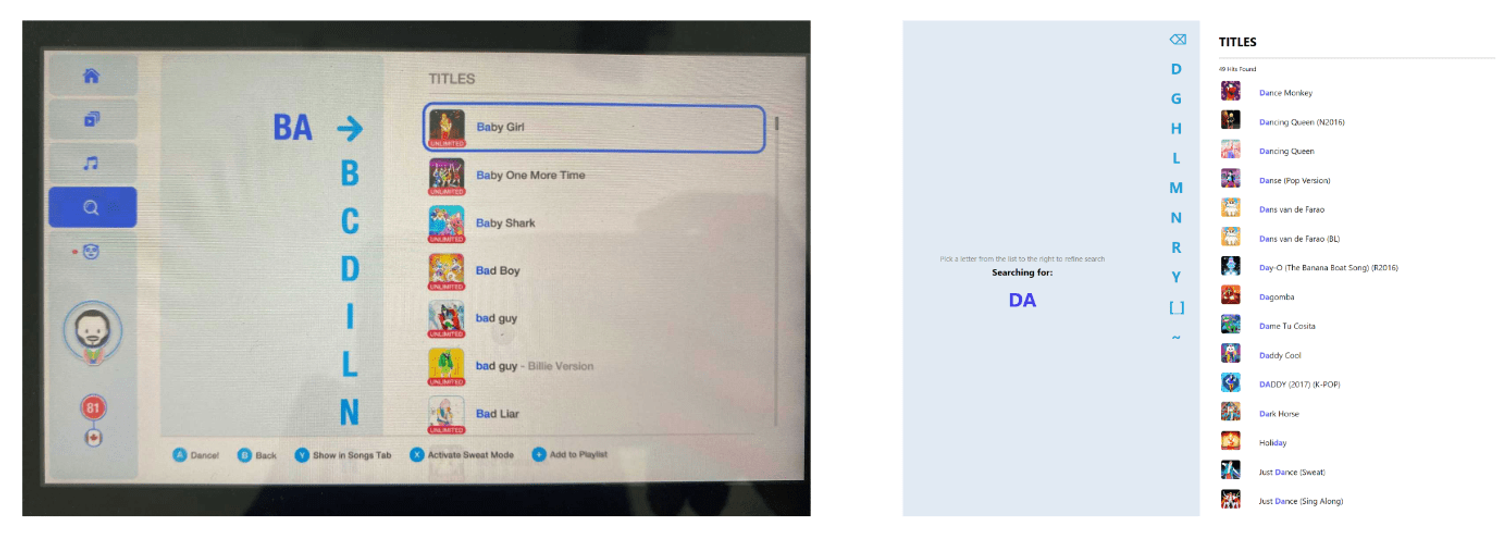
Just Dance is a popular motion-based dancing game by Ubisoft in which players, with a motion controller, mimic dance routines shown on a screen for a vast1 library of songs. At this time of writing, it features 500+ songs and has sold millions of copies to many households worldwide.
My household2 is one of these. Having started a new job remotely, I found the Just Dance 2021 game to be a great way to keep fit and start my work mornings on a pumped-up note.
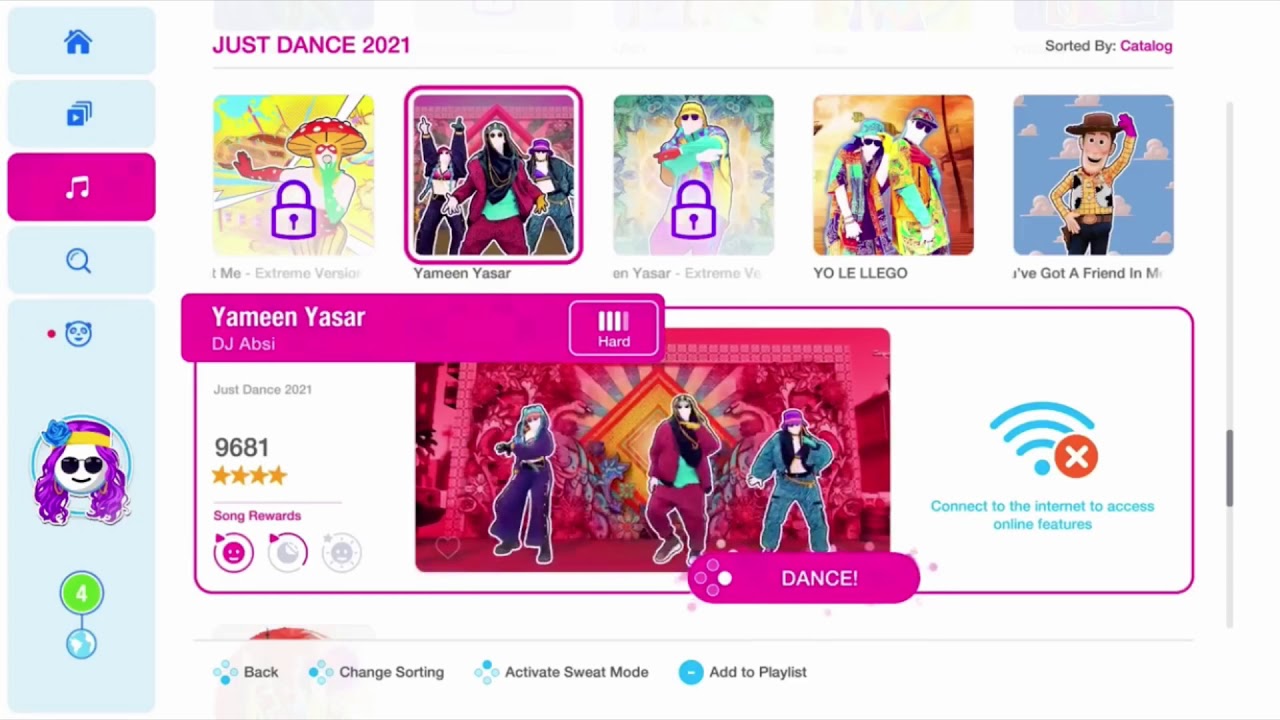
For work, I needed to learn some new technologies (C#, .NET) and figured a great way to do so would be to build a side project. Having played Just Dance 2021 many times, I noticed how cool the search interface was and set out to recreate it.
In this article, I will share my process of recreating the search mechanism of Just Dance 2021: algorithm, backend, and UI.
How might it work?
The game’s search mechanism is quite fun. Since players must use a joystick as the primary input device, they do not have the luxury of using a keyboard to type out what they’re looking for (i.e., the search query). To tackle this design constraint and still keep the experience fun and functional, the creators made it like so:
To view songs for any search query, the player uses their joystick to ‘type it out’ by selecting letter by letter. And every time a letter is selected (or removed), the game refines the search result to the right, displaying all the songs which contain the search query.
For example, in the video above, a player searches for a song containing ‘JUST’ by using the joystick to pick out the letters one-by-one (J-U-S-T). Notice how after they select each letter, the game reloads the search results on the right.
Given that the game provides an increasingly large library of songs to pick from (it’s updated every year), the creators would most likely have to implement their search algorithm to be as efficient as possible. Handheld game consoles (like the Nintendo Switch) have limited processing power3, and I’m sure the creators would rather use that power to render 3D models dancing the Nae Nae than to perform search queries.
Let’s look at how they might design fast and processing-efficient searches. I’ll explain my approach to selecting which algorithm/data structure to use with an analogy.
Analogy: The Ghanaian Vinyl Record Store
In a sense, the Just Dance game is like a song record store (let’s call it Di Asa4 Ltd) located in Ghana, sells vinyl records of popular Ghanaian songs to customers. Customers come in with requests (search queries) like “I am looking for a song which has freedom in its title”, and you, the custodian, must go to the storeroom and find all the records which have ‘freedom’ in their titles.
You just started your national service (~internship) at Di Asa Ltd and soon realize that the storeroom, where all the song records are, is quite chaotic. The records (which are labelled by song titles and artists) are all over the place!

When a customer comes to you with a search query ‘free’, you now have to check the storeroom relentlessly and rush back with all the record(s) that have ‘free’ somewhere in their title (of course, Shatta Wale’s Freedom will be on top of the pile #shattamovement). This problem you face is formally called the Full-Text Search Problem :
Given a collection of documents (song records) S, and criteria C, return all documents for which C is true. The criteria, in this case, is “does record title match with search query Q?”
Check one by one?
You first start with the straightforward approach, a sequential search. On request, you rush to the storeroom and look through all the records one by one. You check every single record to see if its title matches the customer’s search query.
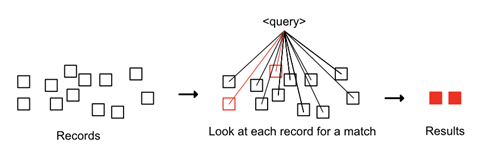
Let’s estimate how much work you must do for a customer request. Assuming that:
- the number of records (n) in the storeroom is 100.
- the length of each record’s title (t) is 10 characters long.
- the length of every customer search query (q) is 2 characters long.
Work (number of checks) ⇒ for each record in all the records × check if its title × matches with every letter in query ⇒ n × t × q ⇒ 100 × 10 × 2 = 2000 checks.
Every time a customer makes a request, you must do ~2000 checks, ebei5 !! This is incredibly frustrating, especially when you are allowed a lean GHS 0.83 (USD 0.14) per hour as a national service personnel.
We can do better. We should do better 😆.
Sort the storeroom and search?
What if you went to work earlier each morning to rearrange the records in the storeroom? With song records sorted by titles alphabetically, you won’t have to check every record to satisfy a customer request. You could perform a binary search on the first letters of record titles to find a record of interest and then look at those around it to see if there are other matches.
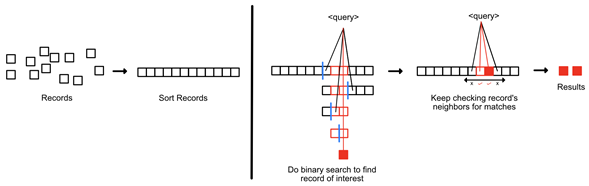
Let’s estimate how much work you must do for a customer request. Assuming that:
- the number of records (n) in the storeroom is 100.
- the length of each record’s title (t) is 10 characters long.
- the length of every customer search query (q) is 2 characters long.
- the number of records that match the query (k) is 2.
Work (number of checks)
⇒ perform a binary search to find a record that matches with first letter of query + get its neighbours which also match × check if their titles × match the search query fully
⇒ log2n + k × t × q
⇒ log2100 + 2 × 10 × 2 = 46 checks
That’s much better!…
But hold up…
This approach will only work for records whose titles start with the search query. But what if the search query is somewhere else in the title (search query is a suffix of song title)? For example, when a customer asks for ‘at‘, the results will include Atta Adwoa by BOSOM P-Yung but will not contain Open Gate by Kuami Eugene or Zafinath Paneah by Nicholas Acheampong, which also have ‘at’ in their titles.
😞 Good try, though. You stick to checking records one by one.
Use an index?
You’ve worked at Di Asa Ltd for a month now and have lost 10 KG from all that running back-and-forth. At the end of a workday, you sit on the terrazzo entrance realising how difficult it is to make an earnest living in Ghana. “I can’t come and kill myself”, you say, “surely there must be a less stressful way to do these searches”.
Sure, the previous approach of sorting the storeroom every morning and then performing a binary search might not have given you entirely correct results. Still, it shows the benefit of preprocessing the collection. There is some value in spending initial effort going through all records to make it easier for you when doing searches later.
So, you buy a giant teacher’s notebook, head to the storeroom and spend some time going through all the song records. You write down common terms that occur in the song titles as headings in your notebook (‘ɔdɔ’, ‘bo’, ‘dey’, ‘nhyira, ‘wengeze’, ‘kpo’). Then under each heading, you list down all the records with the term in their titles and where they can be found. For example, under the heading ‘bo‘ you list Bossu Kena by 5Five, Mintse Bo by Wisa, Aboodatoi by Gasmilla, Boom Boom Tah by Mista Sliva, and where they can be found.
What you’ve just done is create an index on the song titles to search for records of interest faster.

When a customer requests for ‘so‘, you open the notebook and look under the heading ‘so‘. You then check the list underneath and follow the directions for each record entry (Sorkode by Keche - 1st shelf, far right, Ekorso by Kofi Jamar — 2nd shelf, far left) and go precisely to those records. The index makes your searching so much easier!
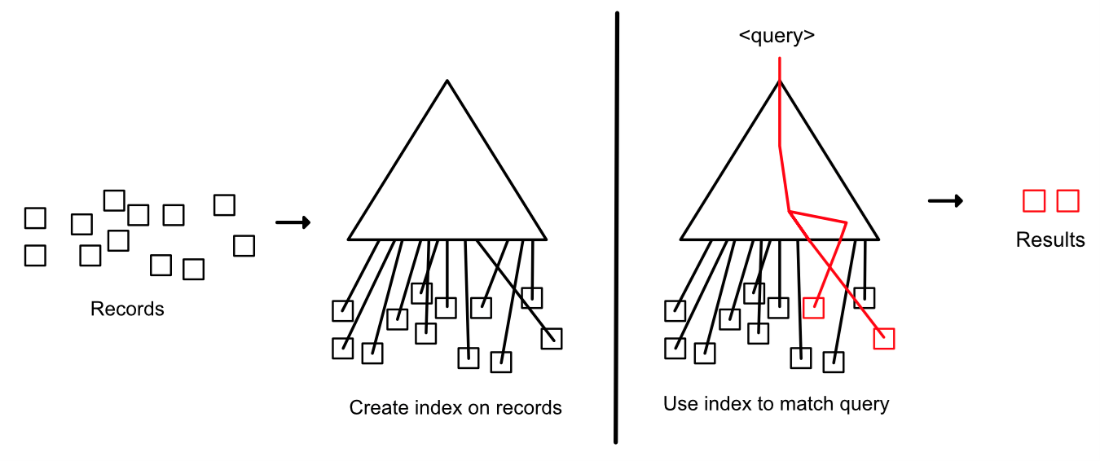
But hold up…
Yes, you’re right. This approach only works for search queries with common terms; it doesn’t work for anything else. To make the approach correct, we’ll need to make an index that accounts for all possible search queries that have matches in record titles.
With a data structure like the Suffix Array, you can store all the positional information for every possible query (as long as it is a suffix of a song title) and efficiently find the correct information (more on this in the implementation and references section)
Let’s estimate how much work you must do for a customer request with the suffix array. Assuming that:
- the number of records (n) in the storeroom is 100.
- the length of each record’s title (t) is 10 characters long.
- the length of every customer search query (q) is 2 characters long.
- the number of records that match the query (k) is 2.
This reduces the amount of work you have to do to
⇒ Use suffix array to find the range of records of interest + return each match
⇒ q × log 2 (n × t) + k
⇒ 2 × log 2 (100 × 10) + 2 = 22 checks!
Yes! By building and using an index (the suffix array), you cut down the number of checks from 2000 → 22! That’s very significant. Good job!👏🏿

End of Analogy
This analogy of Di Asa Ltd explains my process for deciding the primary data structure (and therefore algorithms) with which to implement Just Dance’s search mechanism.
Just as Di Asa Ltd has customers regularly making requests, Just Dance’s search mechanism has players making requests every time a letter is added or removed from the search query.
Given that the game’s song library is not updated often (~once every year, with each release), we can build an index (suffix array) over the library of songs and use that for faster searches.
Now, clap for yourself; you made it this far, take a water break, grab a snack; we’ve been here a while. In the next section, I’ll go into the technical details of how I implemented the search mechanism.
Implementation
In this section, I go into the various aspects of my recreation of Just Dance’s search mechanism: gathering and storing the dataset of songs, implementing the index-based search engine, creating the Web API wrapper, and finally, crafting the user interface.
Stage 1: Gathering and Storing the Dataset
To recreate Just Dance’s search mechanism, I first needed to obtain details about all the songs in the game. I collected that information from the Just Dance Fandom website pages. I initially wrote a C# module to extract the data from the tables on the pages (using the HTMLAgilityPack library). Still, I immediately met many edge cases (non-uniform table layouts, differing columns and rows, and split tables).
Since the extraction process was a one-time operation, I chose the more interactive and nimbler approach:
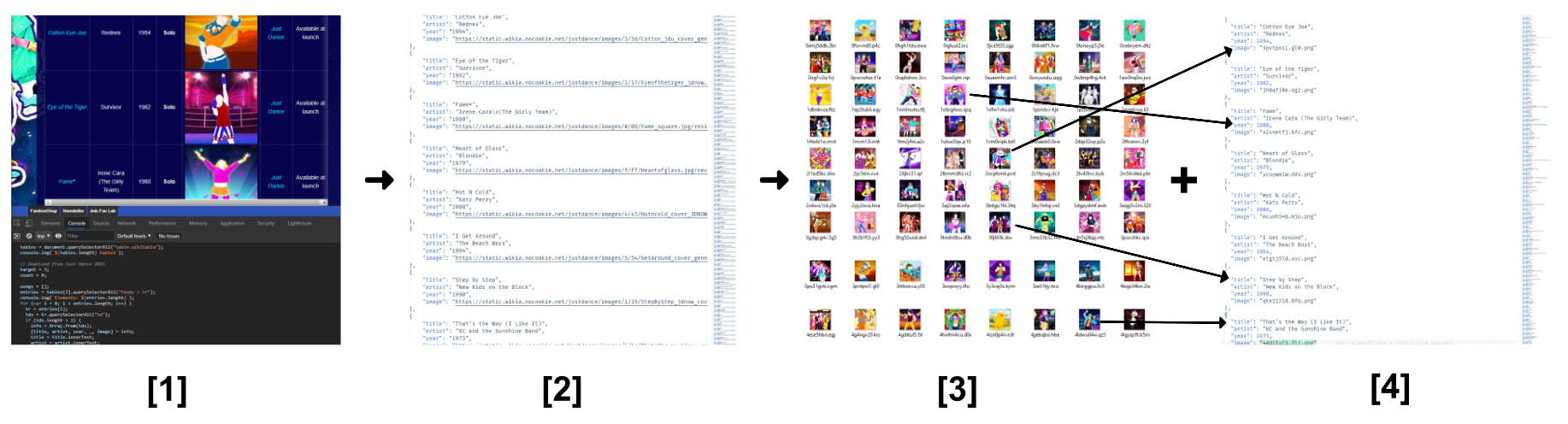
I wrote some JavaScript directly in the web console [1] to extract the data from the pages’ HTML documents into a JSON file [2]. I then wrote some C# code to read in this JSON data, download preview thumbnails to a folder [3], and replaced the URLs in the JSON with randomly generated image file names [4].
At this point, I had all the necessary data:
- a JSON file containing song details (title, artist, year, preview thumbnail filename/id),
- a collection of thumbnail images showing dance previews for each
With the dataset, next was forging the search engine.
Stage 2: Forging the Search Engine
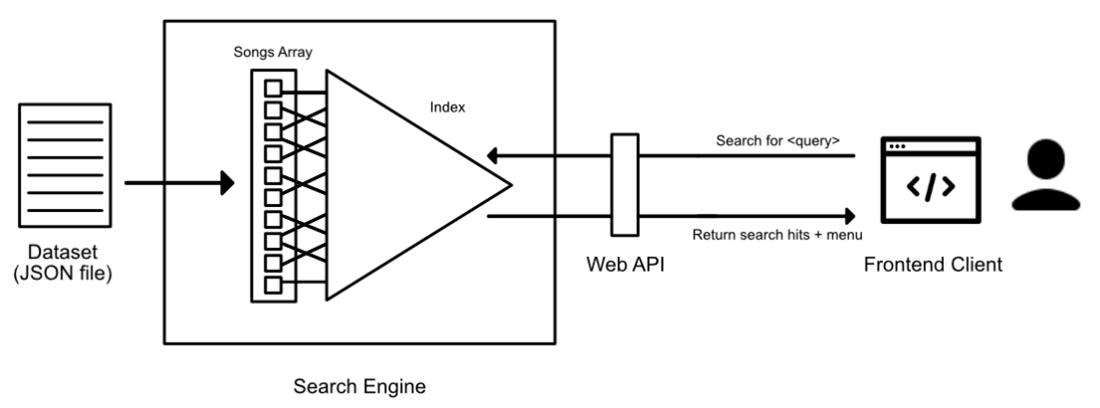
I designed the search engine to have two components: a collection of songs read from the dataset file and an index (suffix array) to enable fast searches. The engine has two stages: initialization and usage.
Initialization
When the program/game starts, the search engine initializes as follows:
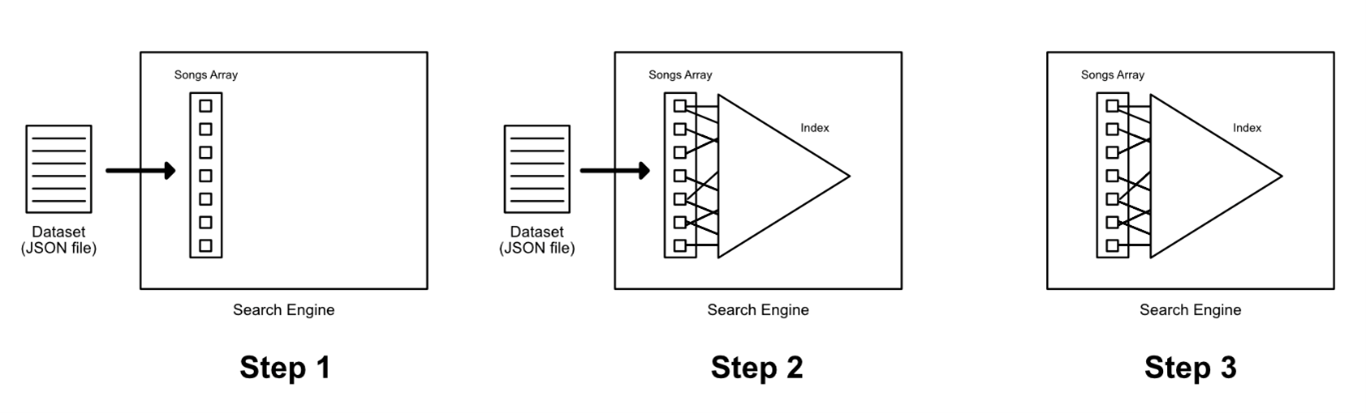
- Step 1: Read (deserialize) data from the JSON dataset into an array of Song objects
- Step 2: Build an index (suffix array) on the array of song objects using ‘title’ as key
- Step 3: Offload the JSON file and keep only the array and index
Usage
When a user makes a search request with a search query, the engine works like so:
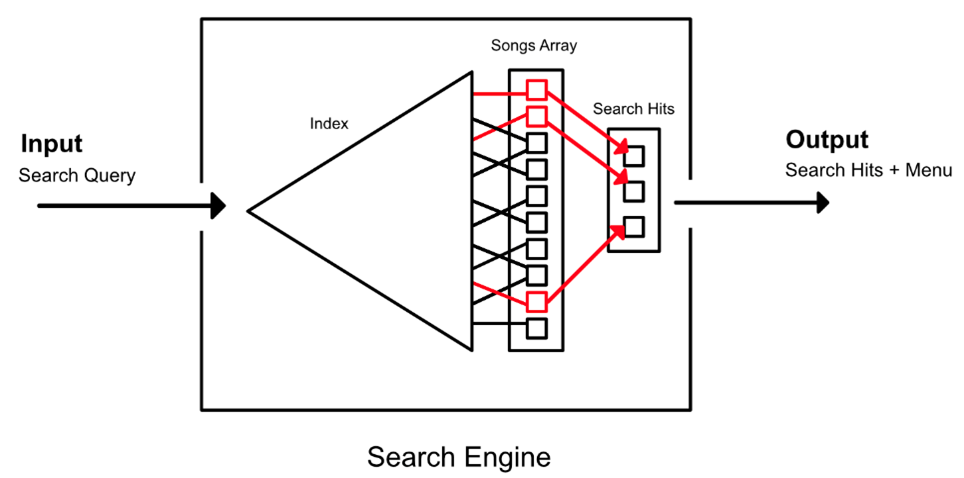
- Use the index to find matches (red lines in figure above) for the search query
- If there are matches, use the positional information for each match to look up the corresponding songs in the array of Song objects.
- Generate a menu (list of characters from which a player can choose to refine their query further)
- Return matches and menu
And voila! That wraps up the high-level overview of the search engine. Now let’s go into more detail about how I implemented the index.
The Index: Suffix Array
In the analogy section, I briefly explained my decision to build an index over all the song titles to enable fast searches because:
- The song dataset is not frequently updated (only once per version release)
- The game’s search mechanism is read-heavy (there’s potentially a search ran every time a user adds/removes a letter to the search query)
I implemented the index with the suffix array data structure because I thought it balanced runtime and space complexity.
Put simply, the suffix array is a sorted array of all suffixes of an input text. And by using two binary searches, we can find a range of suffixes that match a given search query. By storing positional information of the suffixes, we can find all occurrences of the search query in the input text.
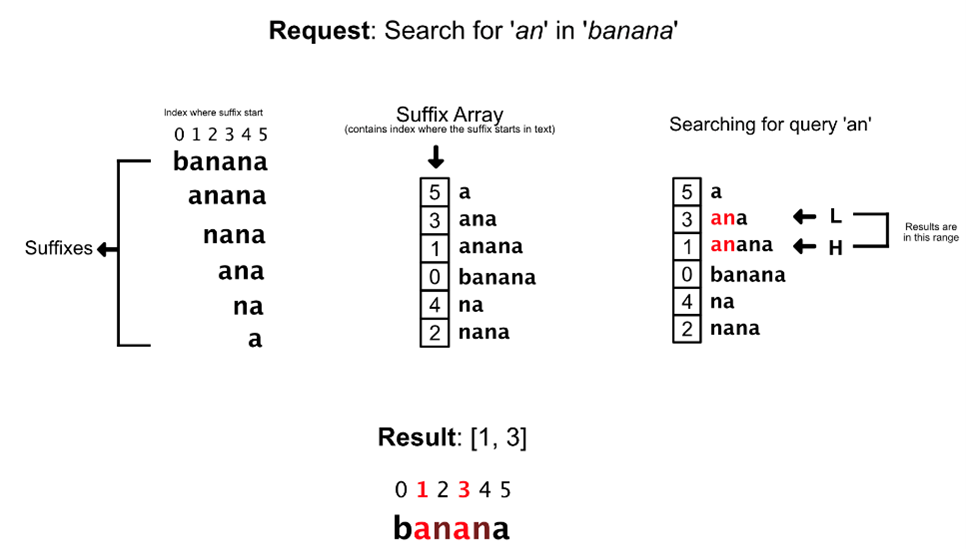
Building the Suffix Array
The suffix array I described above is a simple one that considers only one input string; we only need to store positional information for suffixes in a single integer array. However, in the generalized case, we also need to store information about which song the suffix belongs to, and where in the song title the suffix starts. Therefore, we use a tuple to store the suffix information in the array.
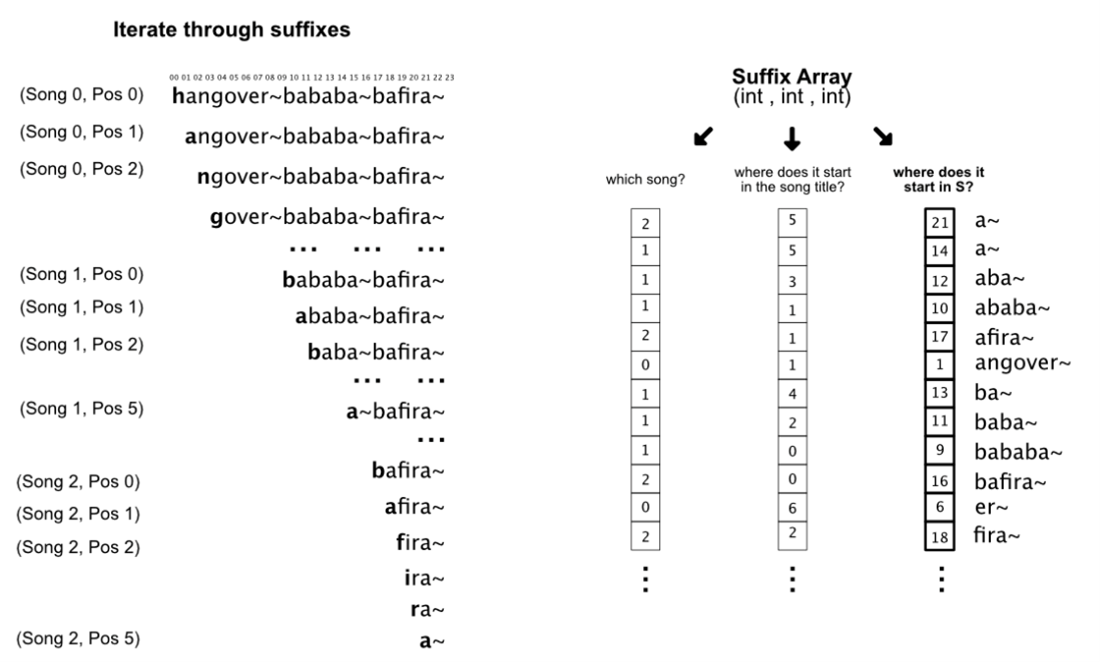
Tuples contain three pieces of positional information about a given suffix:
- where in S the suffix starts, used for matching input search queries
- which song the suffix belongs to, used for looking up songs whose titles match with the input query
- where in the associated song’s title the suffix begins, used for highlighting the pattern in search results as seen in the video game itself
Note that we’re not storing any string values, only integers (positional information). This helps the suffix array use less space/memory.
The method I’ve described above is the naïve approach with runtime complexity O (n × log2n) where n = number of characters in S (lengths of all song titles combined + terminator characters). There are faster approaches that take linear (O(n)) time as described in this article.
Searching the Suffix Array
To find all the songs containing a given search query, we perform two altered binary searches to get the range in the array with suffixes that match the query. The first binary search returns a lower bound, the other an upper bound. We then obtain the positional information (tuple) for each suffix in that part of the array and return the results.
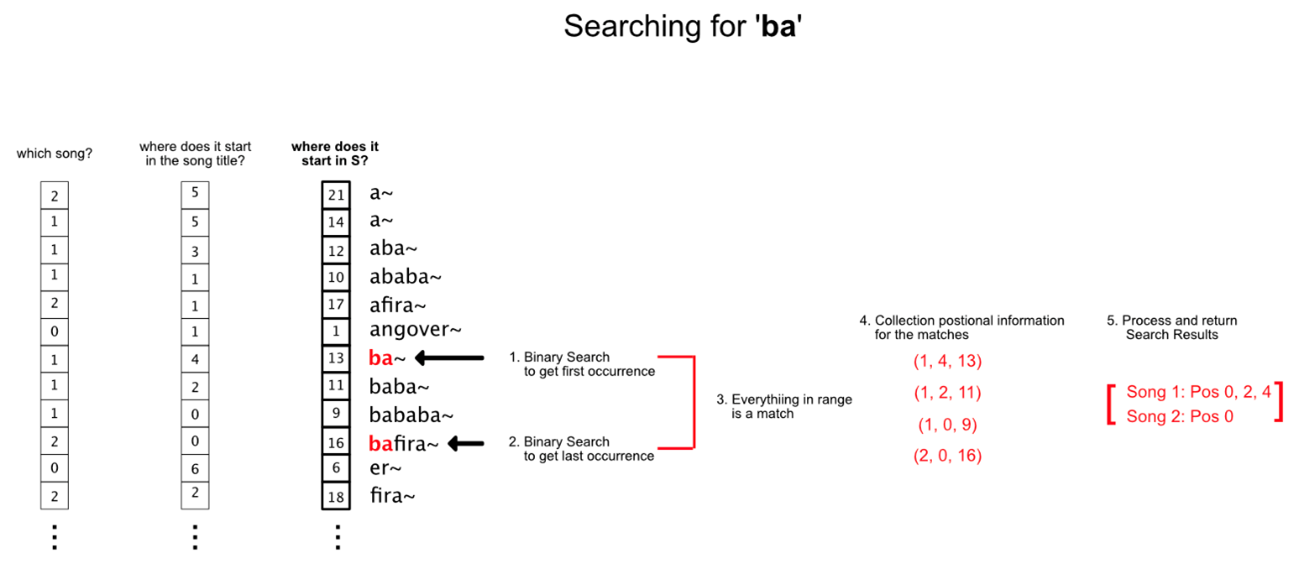
The runtime complexity for search is O(q × log2n+k). We perform binary searches along the suffix array (log2n), and at each step of a binary search, we match the suffix at that position with the search query (length = q). At the end of the search, we process the positional information of all k matches to return results.
Space Trade-Off
For index-based searching, we need to store additional information along with the original collection of songs in memory. Therefore, we make a Faustian deal with the memory devil, sacrificing some memory for search power.
My suffix array implementation stores a tuple of three integers for each suffix (a string of length n has n suffixes); therefore, space complexity is linear O(n) to the number of characters in the input text. Linear space complexity is not bad compared to the initial data structure I used for this project, the suffix tree6, which uses much more memory but for a faster search time.
The search engine components (dataset and index) took about 23 MB of memory.
Performance of Sequential Search vs Suffix Array Method
To see how well my search index implementation performed, I compared the time it took to produce search results with that of the original sequential search method on a workload of search queries. I also compared how well they worked when we introduced a speed-up heuristic particular to how the game’s search mechanism works.
The Heuristic
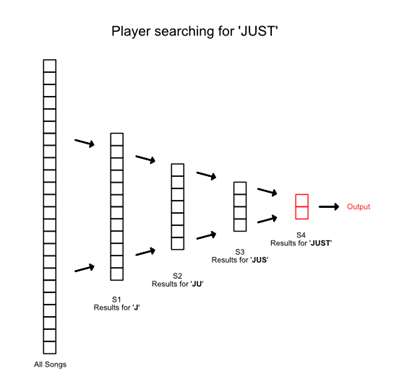
The video game displays results for a given search query as it is typed out letter by letter. For example, to get the search results for ‘JUST’ the game will display results for ‘J’, then ‘JU’, then ‘JUS’ and finally ‘JUST’, what the player is looking for.
Notice that all search results for JU would’ve also been included in search results for J. Similarly, results containing ‘JUS’ will also be based on results containing ‘JU’. The search results for JUS are a subset of JU results, which are also a subset of results for J.
So, when a player types out JU, the engine can store the results. When the player adds ‘S’ to spell ‘JUS’, the engine does not have to search the entire collection of songs again; it only needs to check the search results stored for ‘JU’. This significantly reduces the time taken, as you’ll see in the results section below.
The Experiment
I tested the response time of the various approaches (sequential, suffix array and both with heuristic applied) on workloads of increasing sizes (1, 10, 100, 1000 queries) to see how their performance scaled with increasing workload size (number of queries).
In the experiment, a query is taken from the workload and is used as input for the search methods letter by letter to simulate the user typing. For example, for workload query ‘HANG’, we perform a search for ‘H’, then ‘HA’, then ‘HAN’ and finally ‘HANG’.
I implemented the experiment with the Benchmark.NET framework, which checks to ensure each test runs independent of external influence, and that recorded times are more reflective of actual performance7.
The Results
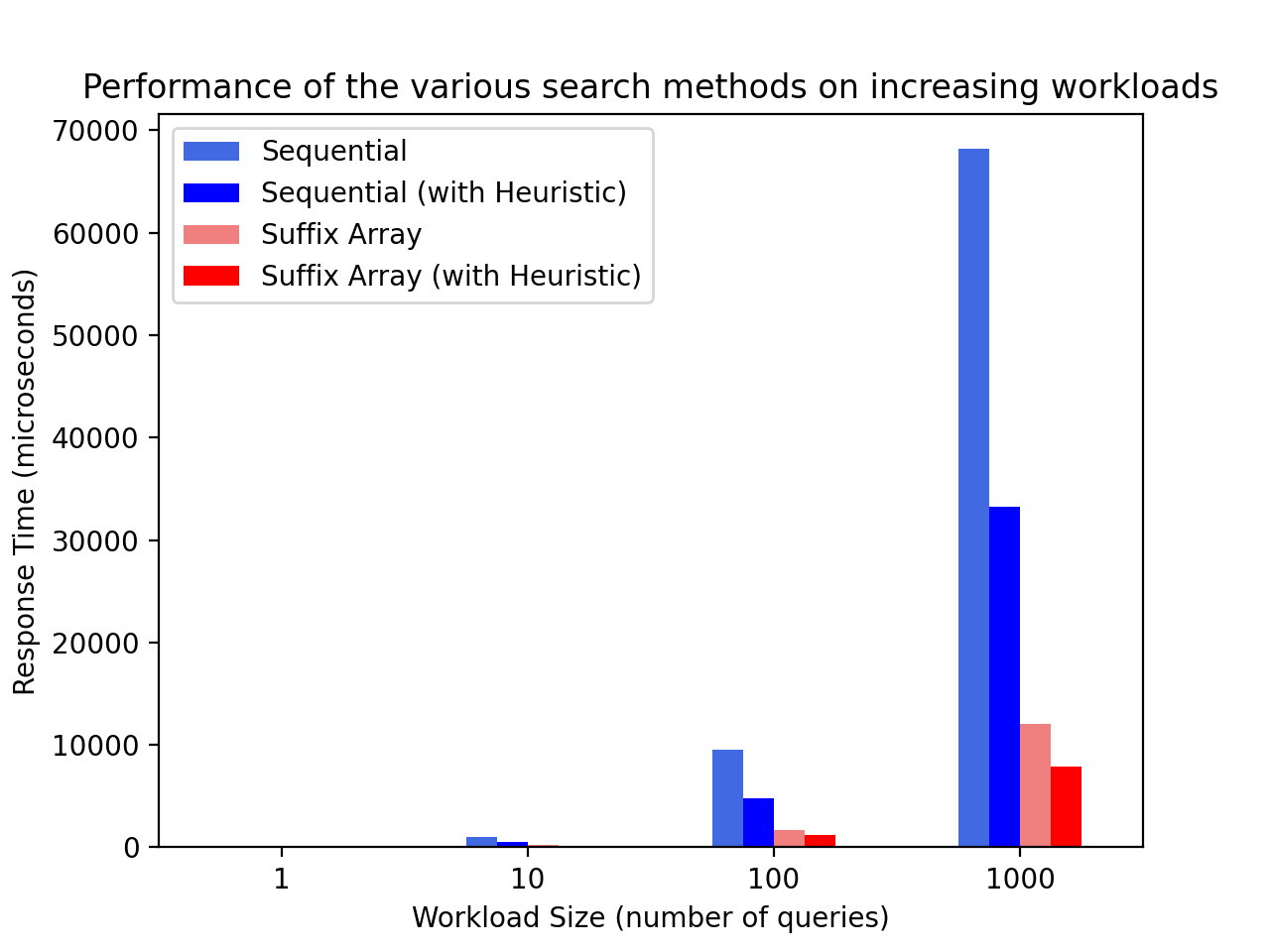
The index-based approach (suffix array) had a better performance than the sequential search approach. It was ~five times faster with consistently lower response times. As expected, the heuristic variant of both approaches performed better than their defaults.
Great, this means the index-based approach would produce faster searches for recreation. With the storage engine fully forged and cooling down, let’s move on to the web API.
Stage 3: Wrapping on the Backend (Web API)
I chose to use web technologies to implement the user interface. Therefore, I needed to wrap the search engine code with a web API to enable it to communicate with the frontend web app. My original mission for this side project was to learn C# and .NET, so I implemented it in ASP.NET, which was surprisingly easy to do.
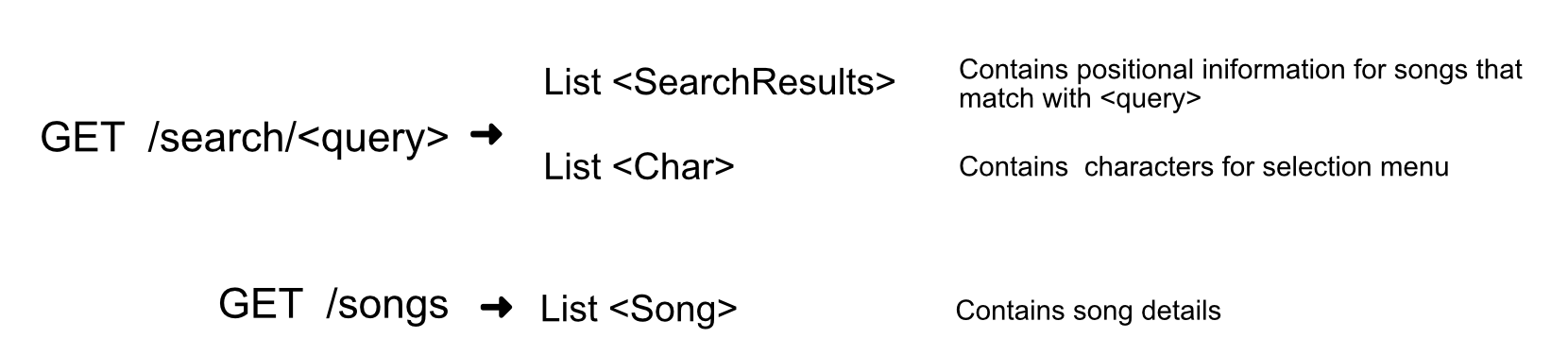
For the web API, I designed two routes:
-
GET
/search/<query>- returns a list of search results (positional information) and an array of characters to display in the selection menu -
GET
/songs- returns the full collection of Song objects. Since the search endpoint returns only positional information (to reduce payload size), the frontend must have a reference to all the songs to display the results to the user.
Stage 4: Crafting the UI
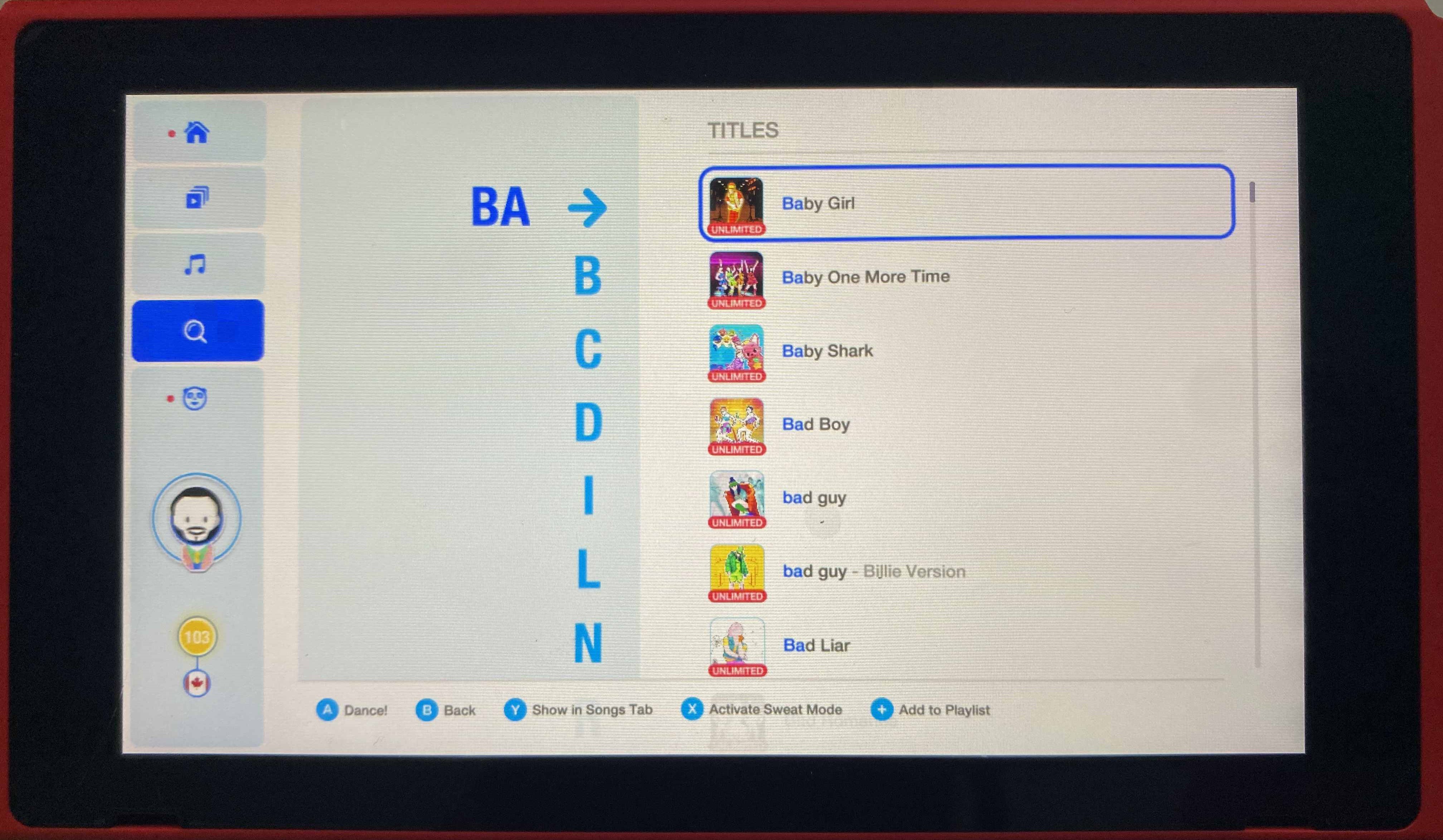
For the UI, I started with some wireframes and broke down the interface into three components:
- Search Query Box: The pane on the left that contains the player’s search query
- Selection Menu: The middle pane that contains all possible characters the player can select to refine their search query further. This is refreshed every time the player adds/removes a character from the search query.
- Results List: The pane on the right that contains search results (song thumbnails and their titles with search query highlighted)
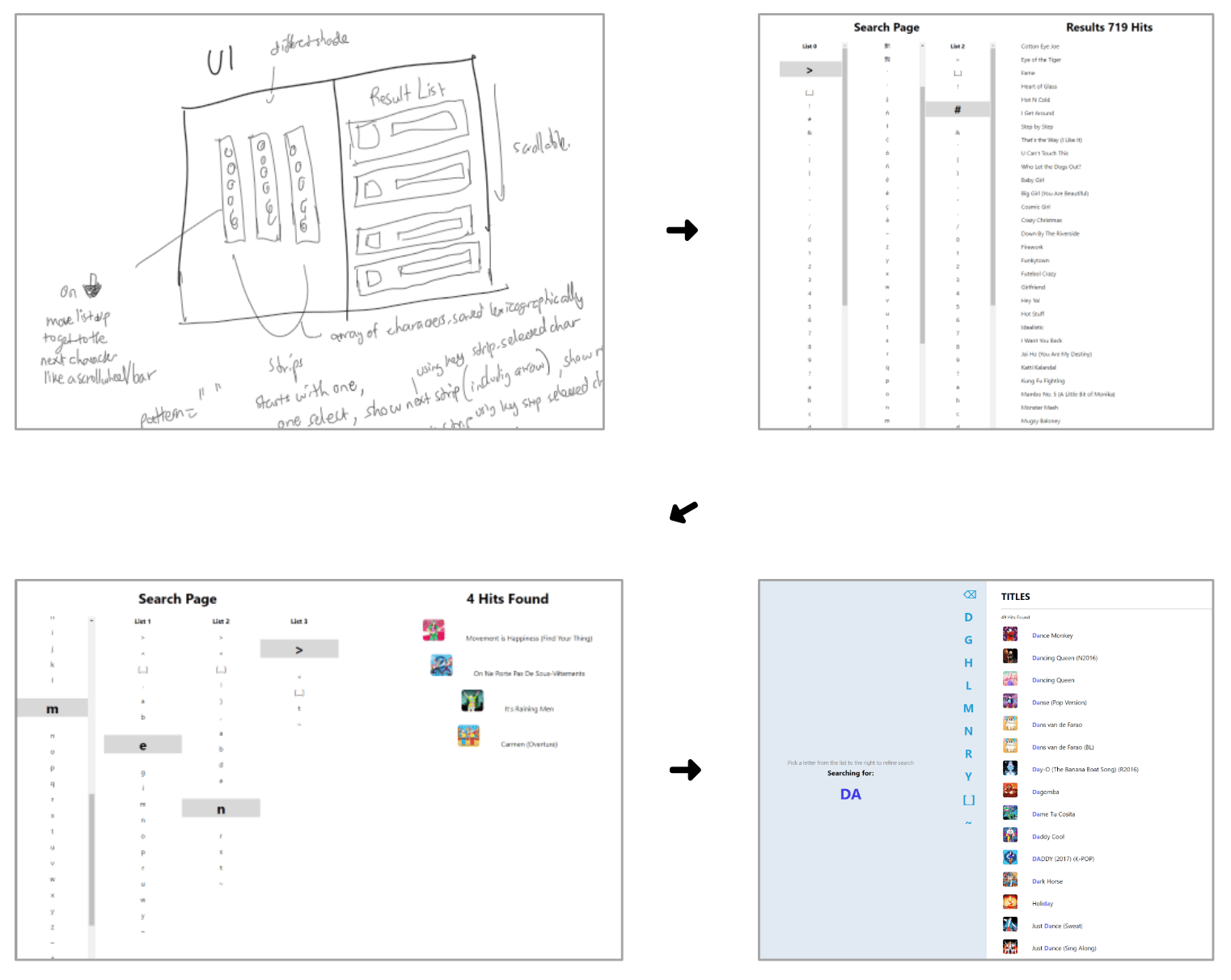
I used React.js to implement the frontend, as its component-based approach looked fitting for this.
When the web app loads, it makes a request to API endpoint
(/songs) to fetch the song array. And as the player modifies
their search query, the web app makes a cache-supported request to API
endpoint (/search/<query>) to obtain the positional
information for the search results. It then uses this information to select
items from the song array to display in the search results pane.
Deployment
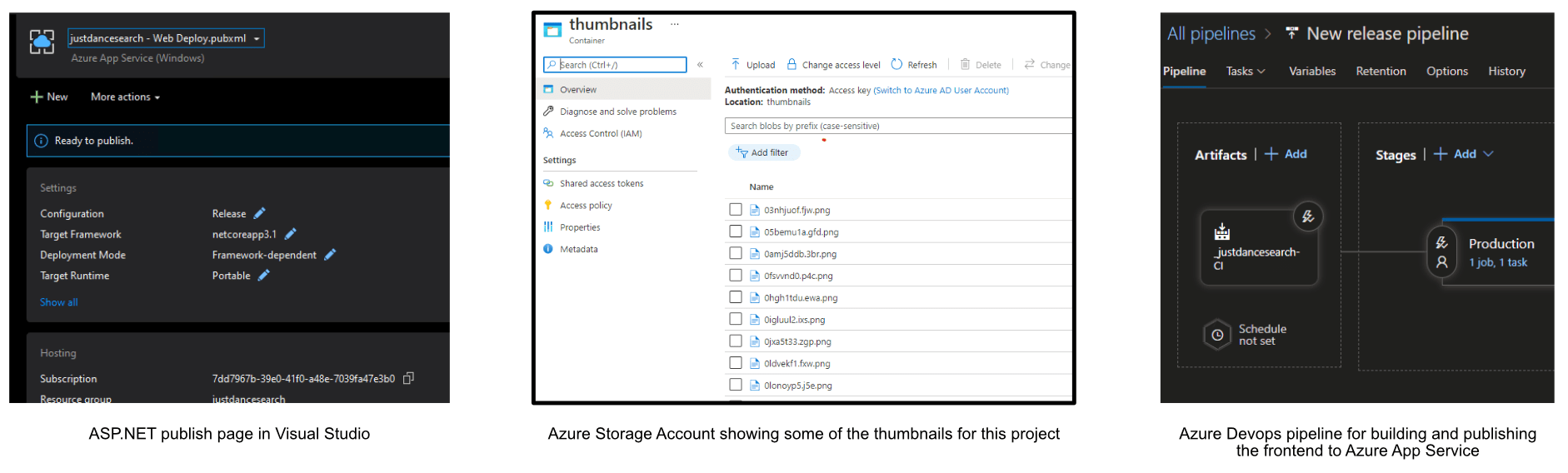
This recreation was majorly with C# and .NET technologies, so it made sense to go the Azure route. I was impressed by how seamless it was to publish the backend API (it only took a few button-clicks). I stored the image thumbnails and dataset file in the Azure Storage service, pushed code to Azure DevOps and used its pipeline feature to build and deploy the react frontend automatically.
Demo
Finally, a video demo to showcase the results of ~14 days of intermittent side-projecting.
Conclusion
This project was a nice way to get into C#, .NET, and string searching algorithms while recreating an aspect of the Just Dance. I’m a huge fan of the video game and would love to chat with a dev on the team (I enjoy your work).
This was my first time encountering index methods, and having to implement a few of those (suffix array + tree) was a good and stressful exercise. Overall great experience 🙂
Acknowledgements
- I want to acknowledge Fandom contributors for making an effort to collate so much information about the game. Without their efforts in compiling information on all the songs, I would not have easily had a dataset to work with.
- I’d also like to thank Oracking, Jean-Sebastien and Boham for reading this long blog post. I appreciate you taking the time to review and provide feedback.
- And finally, Youtube and StackOverflow contributors whose random bits and pieces helped me reason through implementing the indexes.
- This project was for educational purposes only and might not be how the creators implemented their search mechanism. I did not find any leads on their approach from my initial research.
Disclaimers
- The current version of the game, Just Dance 2021, also searches by the artist. To implement this, I’d make another index on the song artists and search that as well.
- This recreation obtains information from the Fandom website for educational, personal, and non-commercial purposes. It, therefore, does not breach the terms of use for the content on the website
- There’s a cool data structure called the FM index that uses potentially less memory and space than the suffix array, but I chose not to explore due to time constraints.
References
- Full Text Search: How it Works — ISS
- Suffix Array Notes (ucdavis.edu)
- Suffix Array (stanford.edu)
- Advanced Data Structures: Suffix Arrays - YouTube
- Advanced Data Structures: Suffix Array Search - YouTube
- Suffix array - Wikipedia
- algorithm - How to Modify a Suffix Array to search multiple strings? - Stack Overflow
- Using the Suffix Tree - Conceptually - YouTube
- Introduction to Suffix Trees (cmu.edu)
- Java Generalized Suffix Tree - Alessandro Bahgat (abahgat.com)
- Generalized Suffix Trees - Baeldung on Computer Science
- Suffix Trees (stanford.edu)
- When should I use a suffix tree over a suffix array? - Quora
- Suffix Trees — John Hopkins
- string - Ukkonen’s suffix tree algorithm in plain English - Stack Overflow